Newsletter
Join the Community
Subscribe to our newsletter for the latest news and updates
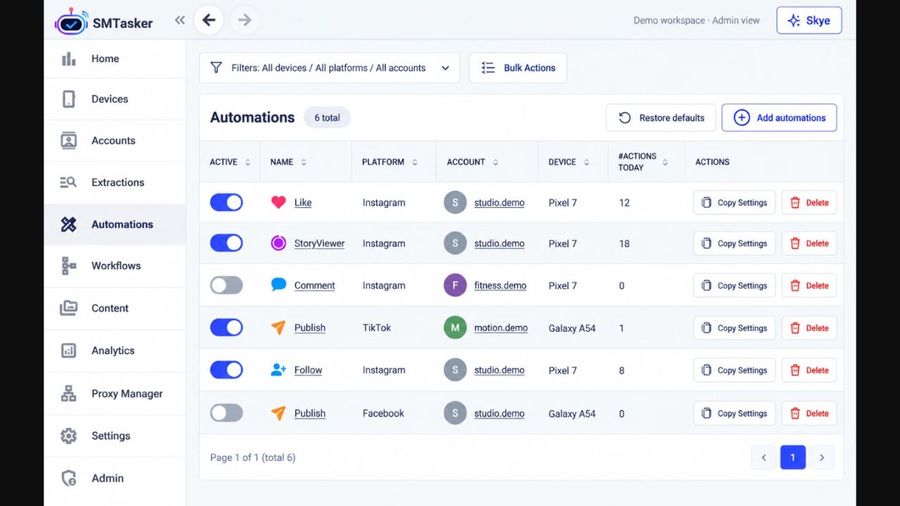
Social media workflows on connected Android devices, with a browser dashboard and optional Skye AI. Product website: https://smtasker.com/
Introduction

Free web tool to view public Instagram profiles, stories, highlights, reels, posts and follower lists anonymously without logging in.
Done-for-You SaaS Visibility for Search & AI | UseWok
Product website: https://smtasker.com/
Overview SMTasker is a social media management and automation product for agencies, creators and businesses that run repeatable publishing and engagement workflows. A browser dashboard provides a place to configure accounts, schedules and limits, while a Windows or Mac client runs the tasks on connected Android devices. The computer and devices need to remain connected for tasks to run.
Key Features The product supports workflows across Instagram, TikTok, Threads, Reddit, Snapchat, YouTube, Facebook, LinkedIn and X. Available actions depend on the platform and the selected tool. Users can set active hours and daily limits, manage publishing routines, and inspect activity logs to understand completed or stopped activity.
Skye AI Manager offers optional assistance with preparing routines, reviewing settings, explaining logs and troubleshooting. Users can also connect compatible external assistants through MCP. Supported workflows can be configured manually; AI assistance is optional. Access to Skye is included in the subscription, while usage from a connected AI provider is billed separately by that provider.
Who It's For Agencies can organize recurring work for client accounts and inspect activity from one dashboard. Creators and small teams can prepare publishing schedules and engagement routines for supported platforms. Operators with several connected devices can choose subscription capacity that matches their setup. The browser dashboard is accessible on desktop and mobile browsers; it works alongside the local desktop client and connected Android devices. The interface is in English and the task setup requires an online computer.
Getting Started Create a SMTasker account, install the Windows or Mac client, and connect supported Android devices. Add the accounts you manage, configure a supported workflow, and review the schedule, active hours and daily limits before starting it. Check the activity logs while testing. Public documentation and video tutorials explain setup and the available tools. Platform rules and account restrictions still apply; automation does not guarantee freedom from restrictions.
Pricing Solo costs $19 per month for one connected device. Growth costs $79 per month for five devices, and Agency costs $179 per month for fifteen devices. Annual billing saves 20%. A Custom plan builder supports an exact device count from 1 to 50 and shows the price and account capacity before checkout. SMTasker offers a five-day trial that requires a payment card. AI-provider usage is separate from the SMTasker subscription.